
The Best DIY STEM Tutorials and Projects

OVERVIEW
In this project we will make Electronic Dice using Arduino Uno and LEDs, we will press a button to switch random numbers of LEDs.
You can follow this video and the instructions below to make this Amazing Automatic Door Project.
Video
Components Required
Here is a list of Components that we will need to make this Project.
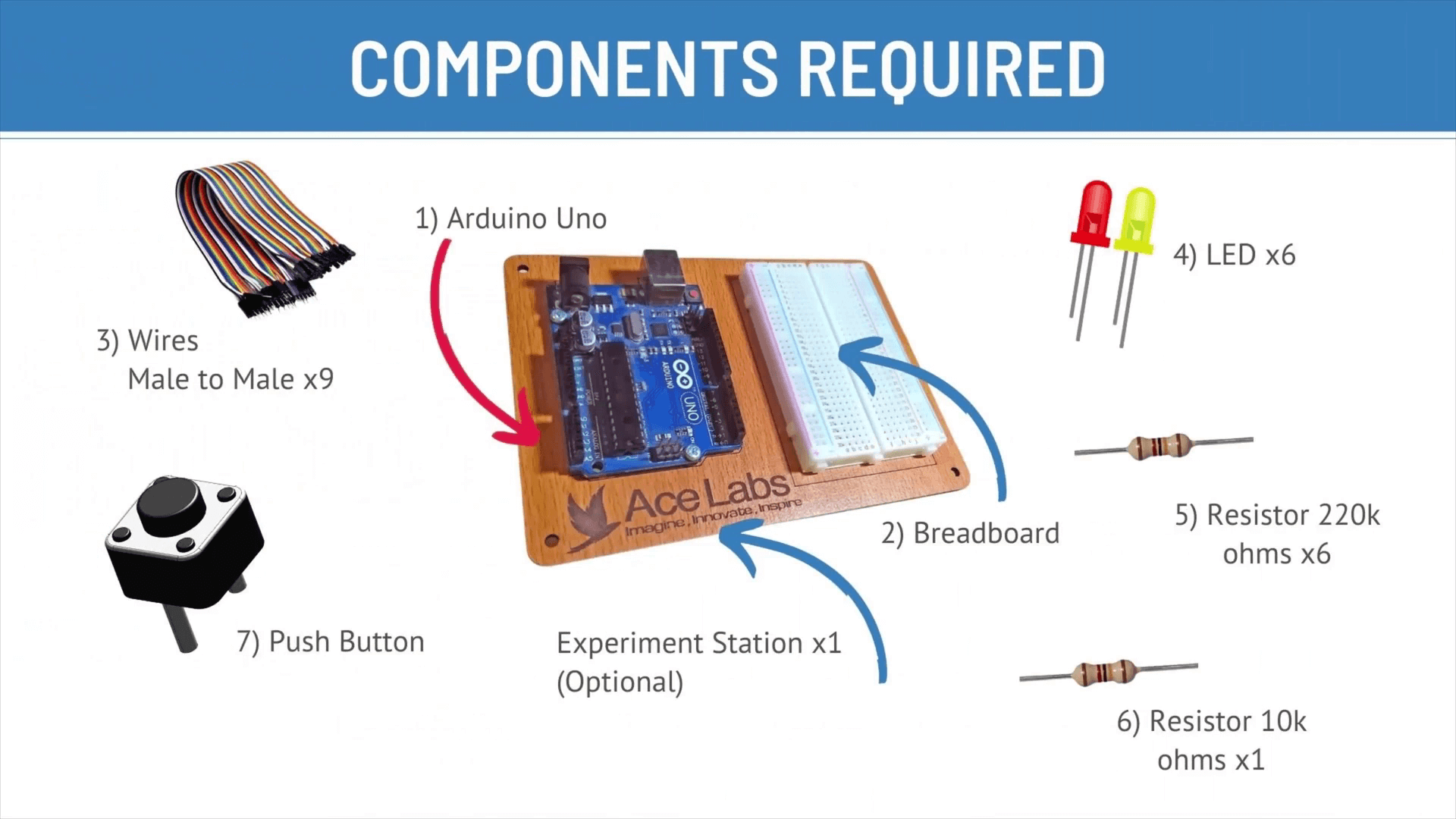
| Sr # | Item Name | Quantity |
|---|---|---|
| 1 | Arduino Uno | 1 |
| 2 | Breadboard | 1 |
| 3 | Male to Male Jumper Wire | 9 |
| 4 | LED | 6 |
| 5 | Resistors 220k ohms | 6 |
| 6 | Resistors 10k ohms | 1 |
| 7 | Push Button | 1 |
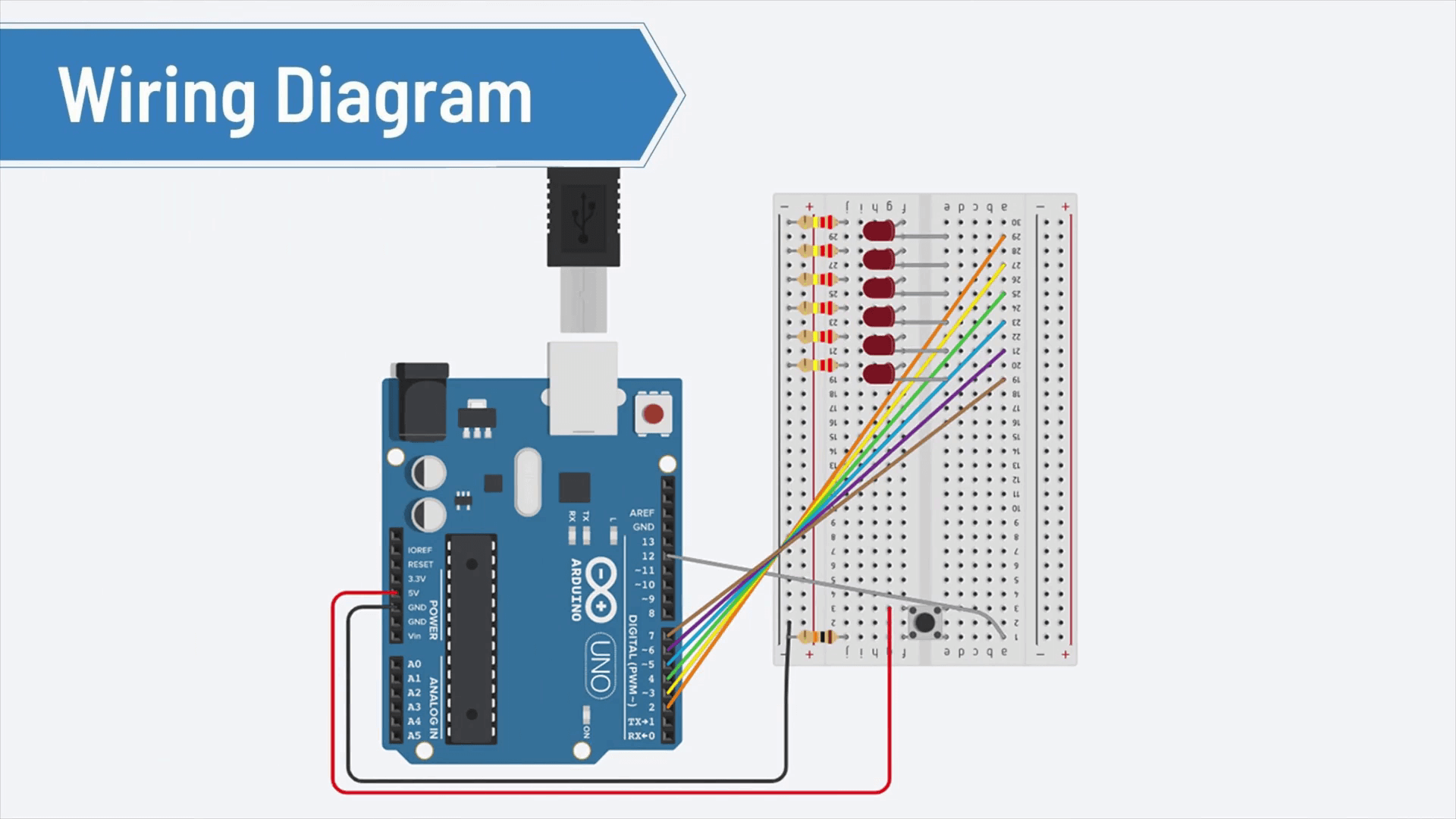
Wiring Diagram
Here is a Complete Wiring Diagram along with Instructions for this Project
Program / Code
Code is Explained in the Comments of the Code

// Arduino Dice by ____ AceLabs ____  www.theacelabs.com


                     // set to 1 if we're debugging
#define DEBUG 0

                     // 6 consecutive digital pins for the LEDs
 int first = 2;
 int second = 3;
 int third = 4;
 int fourth = 5;
 int fifth = 6;
 int sixth = 7;

                      // pin for the button switch
 int button = 12;
                      // value to check state of button switch
int pressed = 0;

void setup() {
                       // set all LED pins to OUTPUT
    for (int i=first; i<=sixth; i++) {
    pinMode(i, OUTPUT);
  }

                       // set buttin pin to INPUT
  pinMode(button, INPUT);

               // initialize random seed by noise from analog pin 0 (should be unconnected)
  randomSeed(analogRead(0));

               // if we're debugging, connect to serial
    #ifdef DEBUG
    Serial.begin(9600);
    #endif
  }

void buildUpTension() {
  // light LEDs from left to right and back to build up tension
  // while waiting for the dice to be thrown
  // left to right

    for (int i=first; i<=sixth; i++) {
    if (i!=first) {
    digitalWrite(i-1, LOW);
    }

    digitalWrite(i, HIGH);
    delay(100);
  }

  // right to left
    for (int i=sixth; i>=first; i--) {
    if (i!=sixth) {
    digitalWrite(i+1, LOW);
    }
    digitalWrite(i, HIGH);
    delay(100);
  }
}

void showNumber(int number) {
    digitalWrite(first, HIGH);
    if (number >= 2) {
    digitalWrite(second, HIGH);
  }
    if (number >= 3) {
    digitalWrite(third, HIGH);
  }
    if (number >= 4) {
    digitalWrite(fourth, HIGH);
  }
    if (number >= 5) {
    digitalWrite(fifth, HIGH);
  }
    if (number == 6) {
    digitalWrite(sixth, HIGH);
  }
}

int throwDice() {
                        // get a random number in the range [1,6]
  int randNumber = random(1,7);

    #ifdef DEBUG
    Serial.println(randNumber);
    #endif

    return randNumber;
}

void setAllLEDs(int value) {
    for (int i=first; i<=sixth; i++) {
    digitalWrite(i, value);
  }
}

void loop() {
                   // if button is pressed - throw the dice
    pressed = digitalRead(button);

    if (pressed == HIGH) {
    // remove previous number
    setAllLEDs(LOW);

    buildUpTension();
    int thrownNumber = throwDice();
    showNumber(thrownNumber);
  }

}
Thank you so much for going through our tutorial, we hope it was easy to follow and you enjoyed it, please share your feedback and pictures of the project (if you have made it) in the comments below .!


